The Uber Eats app is the easy and reliable way to get the food you want, delivered fast and fresh. Tap the app and pick from hundreds of full menus from local restaurants and have your order delivered to you at Uber speed. Uber Eats Gift Card (US) is a great food gift for friends and loved ones that ensures good memories, whether they order a snack for themselves or put on a full spread for your next meetup. It can be used to add value to your Uber Eats account, too.
Note:
- The Uber Eats Gift Card sold in SEAGM was a region-currency-locked card.
- All purchases made in SEAGM, once they're delivered, are non-returnable, non-exchangeable, and non-refundable.
Step 1: Once the purchase from SEAGM is completed, kindly retrieve your game card code in "My Cards".
Step 2: Make sure you have the latest version of the Uber Eats app installed.
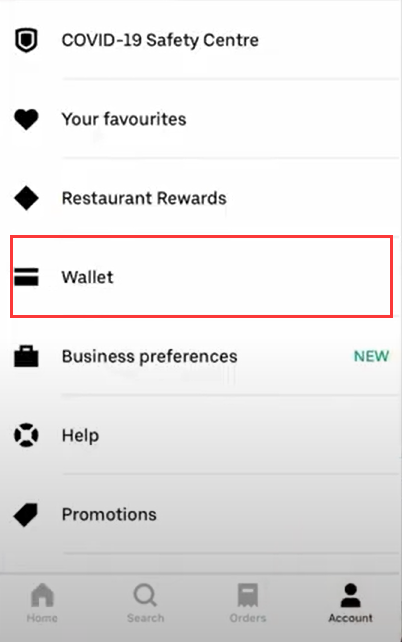
Step 3: Open the Uber Eats app, tap the Account icon, then select Wallet.
Step 4: Select + Gift Card.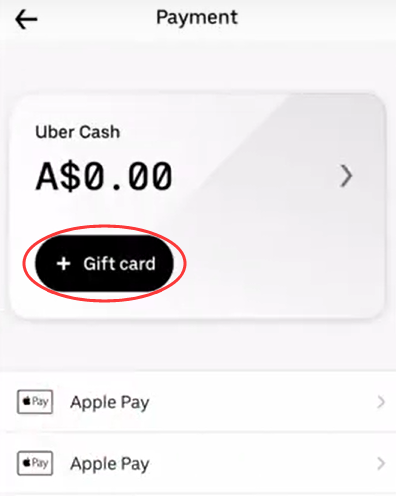
Step 5: Enter your PIN/gift code purchased from SEAGM.
Step 6: Tap Add to complete the redemption.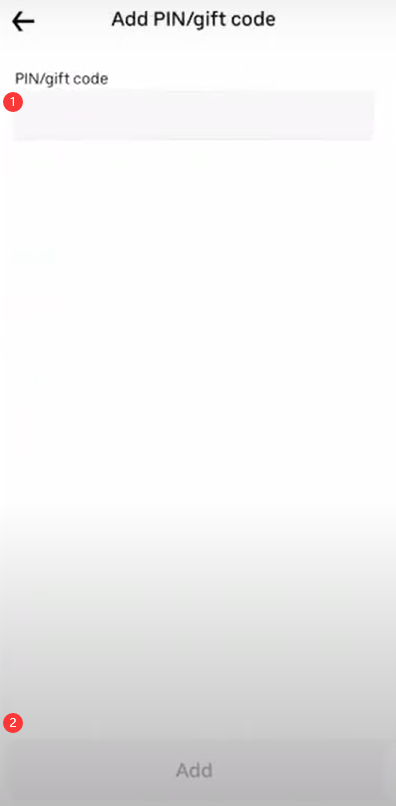
Step 7: Once done, the balance in the account will be updated. For next time you order, select Uber Cash as your preferred payment method.
Thank you.
Visit the SEAGM Support site for quick answers and guides.
Need support? Contact our Customer Support via LiveChat .