Important Note:
- Starbucks Gift Cards sold by SEAGM are region-restricted. Please confirm your region before purchase.
- All purchases made in SEAGM, once they're delivered, are non-returnable, non-exchangeable, and non-refundable.
- Please ensure your Starbucks App is updated to the latest version for a smooth login experience.
Step 1: Once the purchase from SEAGM is completed, kindly retrieve your game card code in "My Cards".
Step 2: Sign in to your Starbucks account from Apps.
Step 3: Navigate to [PAY]. Then, click on [ADD CARD]. Enter the Card Number (Code from your voucher link) and Security Code (Activation PIN from your voucher link).
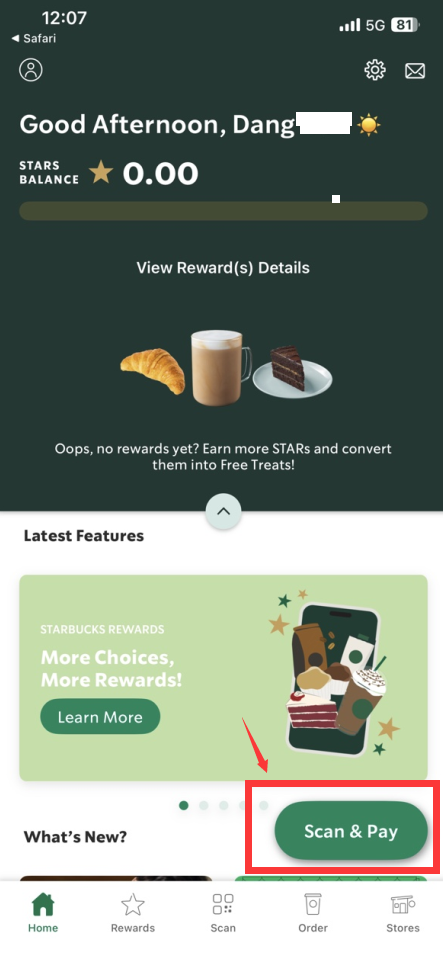
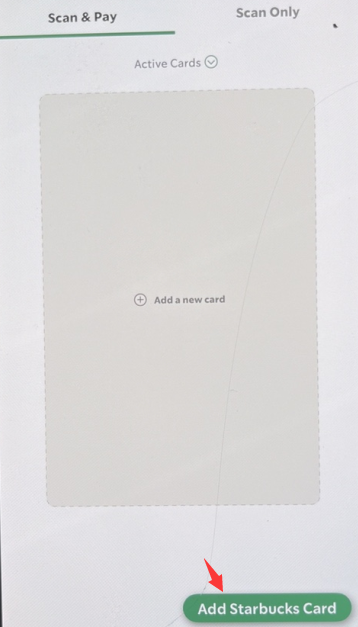
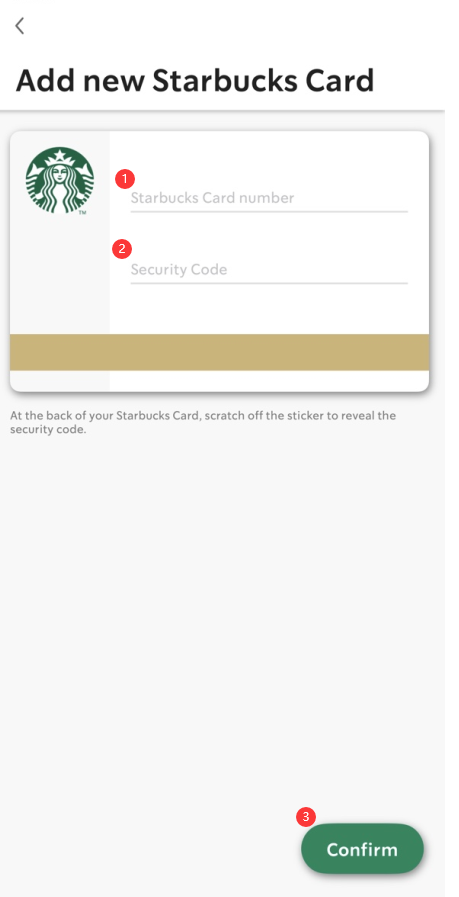
Step 4: Click on confirm to complete the process. You will be able to check in Apps anytime on the card details.
Thank you.
Visit the SEAGM Support site for quick answers and guides.
Need support? Contact our Customer Support via LiveChat .