A Fortnite Gift Card is a prepaid option that allows players to redeem V-Bucks, subscribe to Fortnite Crew, or access other digital content through the Epic Games Store. It offers a safe and convenient way to add funds to an Epic Games account without the need for a credit card. Players can use the card to purchase in-game cosmetics such as outfits, emotes, pickaxes, and Battle Passes, or, with the newer cards introduced in 2025, extend its use to Epic Games Store games and add-ons. This versatility makes it an appealing choice for gamers, while also serving as a thoughtful gift that gives recipients the freedom to select their favourite content.
Important Note:
- Fortnite gift cards are currency-specific, so the currency of your card must match the currency of your Epic account balance to redeem the card.
- All purchases made in SEAGM, once they're delivered, are non-returnable, non-exchangeable, and non-refundable.
Step 1: Once the purchase from SEAGM is completed, kindly retrieve your game card code in "My Cards".
Step 2: Visit the official Epic Games redemption page.
Step 3: Sign in using your Epic Games account. Make sure it’s the same account you use to play Fortnite.
Step 4: Enter the gift card code purchased from SEAGM, then click Next.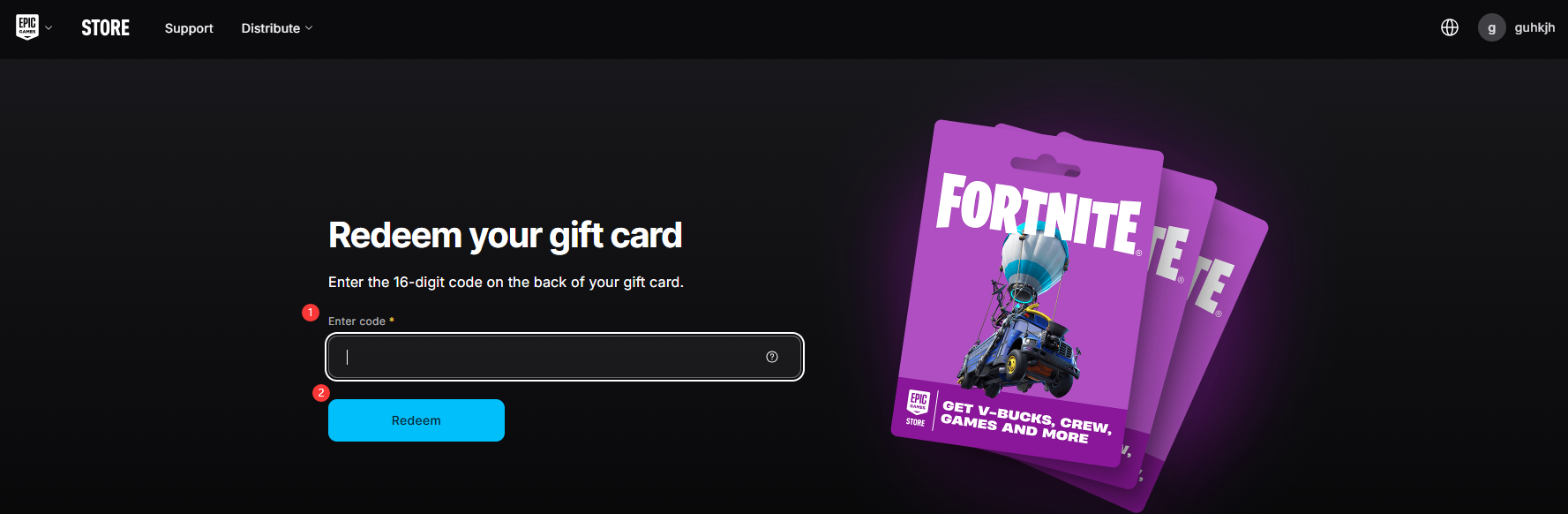
Step 5: Select the platform on which you play Fortnite.
Step 6: Confirm the details and proceed with the redemption. Your V-Bucks or applicable content will be added to your Epic Games account shortly after the process is completed.
Thank you.
Visit the SEAGM Support site for quick answers and guides.
Need support? Contact our Customer Support via LiveChat .