Important Notice:
- Foodpanda Cash Vouchers (MY) sold by SEAGM are valid for use in Malaysia only.
- All purchases are strictly non-refundable and non-returnable.
- Valid with a minimum order of RM1.
- Gift cards can be used to cover delivery fees and GST.
- Valid for 30 days from the date of issue.
- Applicable for use within Malaysia only.
Step 1: Once the purchase from SEAGM is completed, kindly retrieve your game card code in "My Cards".
Step 2: Open the Foodpanda app on your mobile device and log in to your account.
Step 3: Once logged in, tap the “Account” icon located at the bottom of the app interface. This will bring you to your personal settings and account overview.
Step 4: In the Account section, select “Vouchers” from the list of available options. This is where all discount codes, promo codes, and gift cards are managed.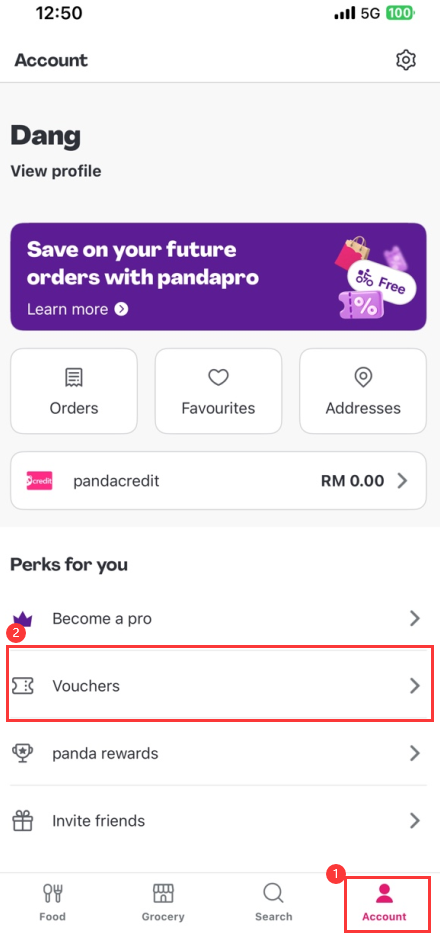
Step 5: Navigate to the “Add a Voucher” tab. Here, copy and paste the Foodpanda gift card code you received from SEAGM into the input field, then tap “Save”.
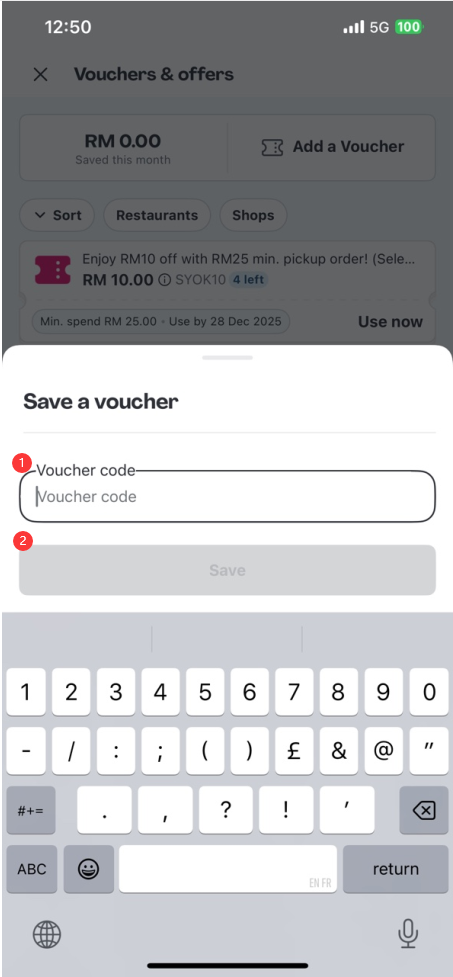
Step 6: Once saved, the gift card will appear under “My Vouchers”. This confirms the code has been successfully added to your account.
Step 7: When placing your next order, proceed to checkout as usual. In the payment section, select or apply the voucher from your My Vouchers list to enjoy the credited amount.
Thank you.
Visit the SEAGM Support site for quick answers and guides.
Need support? Contact our Customer Support via LiveChat .