Step 1: Once logged in to your SEAGM account, click "Top Up" at the top right corner.

Step 2: At the user credit balance topup, key in the top-up amount needed. Next, click 'Top up' to proceed.

Step 3: At the SEAGM Pay page, choose online banking and select the desired bank/payment channel, then click "Pay Now."
Note: You may be asked to allow pop-ups and redirect windows from the payment gateway. To enable the pop-ups, kindly refer to the Google support page. 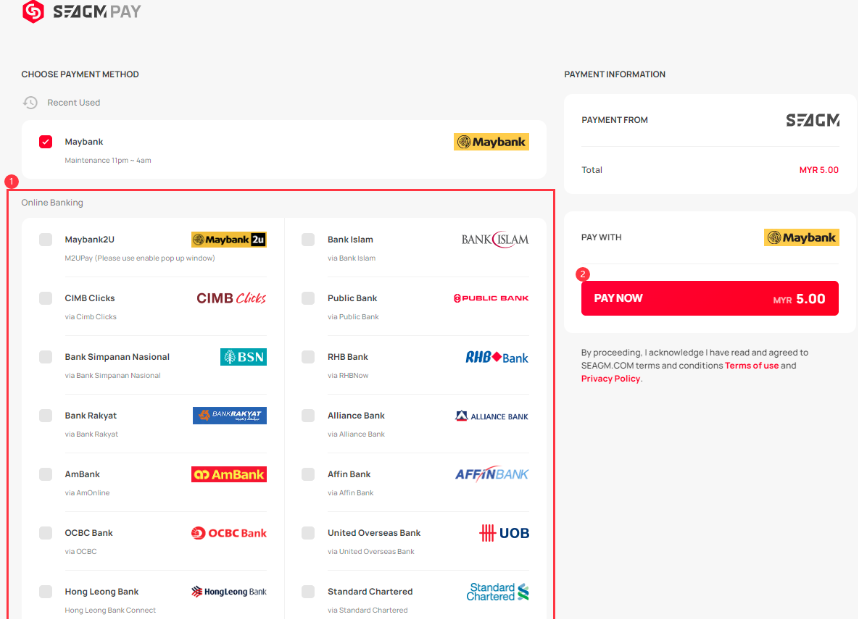
Step 4: At the Online Banking page that you've chosen, log in to your online banking account to continue. Kindly follow the on-screen instructions to make the payment and allow the payment gateway to redirect you back to our website to complete the transaction.
Step 5: Once you have successfully topped up your SEAGM account credits balance, you may check the balance in "Transaction History". 
Thank you.
Visit the SEAGM Support site for quick answers and guides.
Need support? Contact our Customer Support via LiveChat .