Tips:
1. Check your player information before checkout.
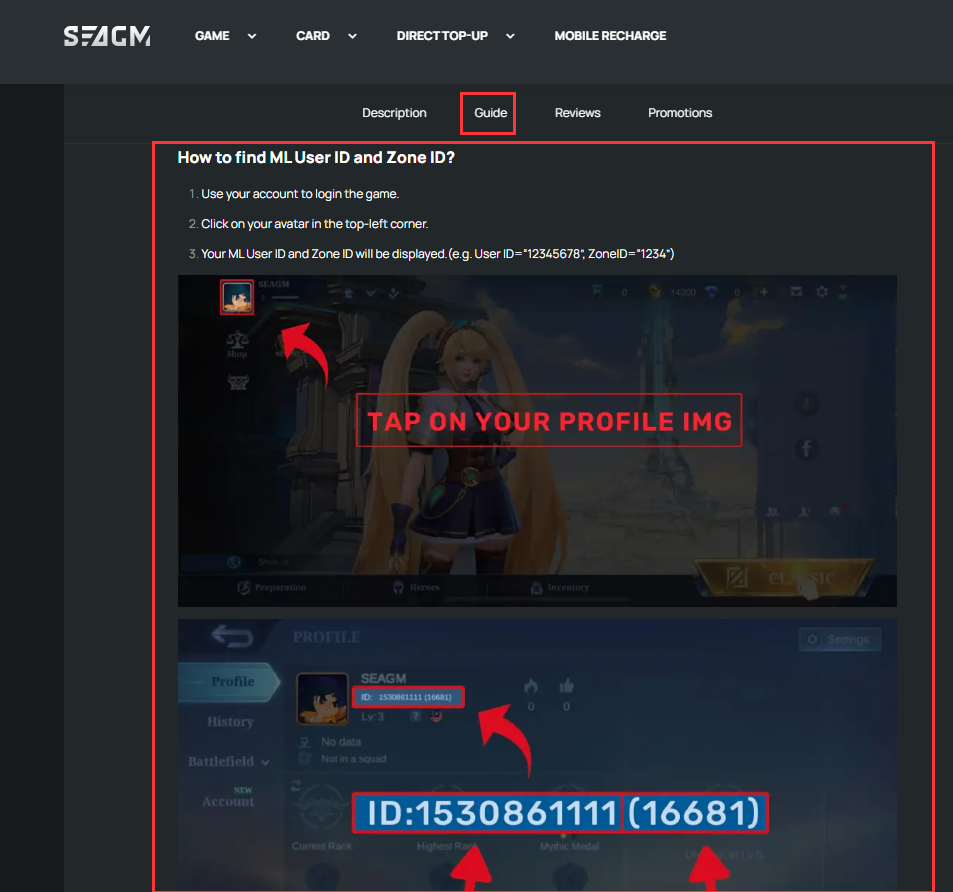
Always verify your account ID, in-game name, and server/region to make sure they are correct. Review your order summary carefully before confirming payment.

2. Refer to SEAGM’s product instructions before placing an order.
Most product pages on SEAGM include step-by-step guides with pictures to help you locate the correct player ID or account information. Simply scroll down the product page to find the instructions. If you are still unsure or cannot find your ID/server on the product page, contact our LiveChat support for assistance.
FAQ:
1. Why is my game server not available on the product page?
No worries! Contact our LiveChat support team, and we will check with the relevant team. If stock for that server is available, we will add it as soon as possible. Please note that this process may take some time.
Thank you.
Visit the SEAGM Support site for quick answers and guides.
Need support? Contact our Customer Support via LiveChat.
Thank you.
Visit the SEAGM Support site for quick answers and guides.
Need support? Contact our Customer Support via LiveChat .