DuitNow is a convenient way to send and receive money instantly at your Online Banking or eWallet. Transfer funds to any DuitNow ID including Mobile number, MYKad/Passport number, Army/Police number as well as Business Registration number.
Step 1: Choose your products in SEAGM and click "PayNow" to be directed to the checkout page. 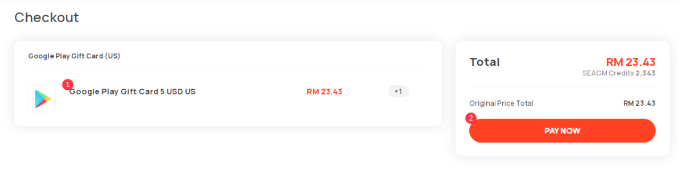
Step 2: Select the preferred bank under the offline payment section and click on "Create Payment" to proceed.
Step 3: Only clicked, details of the SEAGM bank account will be displayed. Kindly transfer the amount to the bank details as shown.
Step 4: Kindly login to your preferred Mobile Banking site/app. Then, select the "transfer" or "DuitNow transfer" option and fill in the details.
Note: The example used below will be for Public Bank mobile apps. For more information, kindly directly check on DuitNow Official Site.
Step 5: Kindly fill in the details as referred to the SEAGM checkout page to proceed.
Step 6: A confirmation page will be displayed. Kindly confirm the details with the amount and complete the transaction.
Step 7: Once the transaction is completed, kindly contact our customer support team via LiveChat for manual payment checking.
Thank you.
Visit the SEAGM Support site for quick answers and guides.
Need support? Contact our Customer Support via LiveChat .