When attempting to check out, you may encounter the following error message: “Sorry. The [country] of your mobile phone number is not in the regional whitelist. Please modify your phone number.”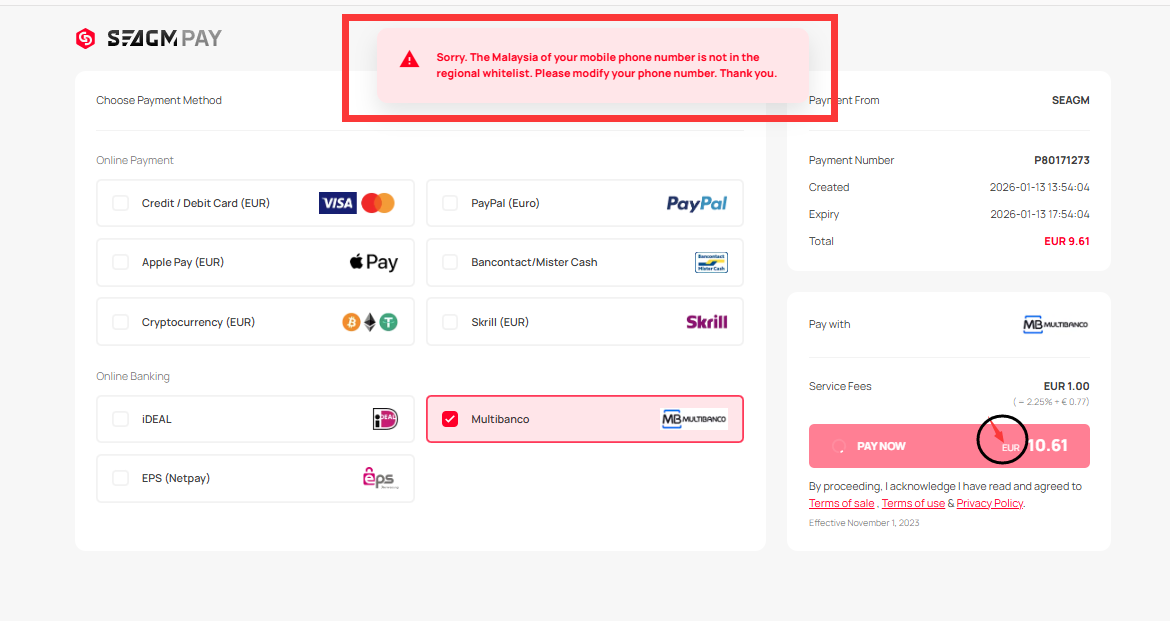
Why am I seeing this error?
This error may appear when the currency selected at checkout does not match the country associated with your verified account.
For security and payment verification purposes, certain payment methods require the selected currency to match your account's verified country.
How can I resolve this issue?
To resolve the error:
- Go to your Profile Settings.
- Check the country associated with your verified mobile phone number.
- Update your mobile phone number's country to match the currency you selected.
Once your account information matches the selected currency, place a new order and proceed to checkout again.
Can I use a different currency from my account country?
This depends on the payment method you select. For security reasons, some payment methods require the selected currency to match your account's verified country. If you want to use a different currency, you may need to update your verified account country to match the selected currency.
If you continue to encounter the error after updating your account information, please contact SEAGM LiveChat for further assistance.
ขอบคุณ
เยี่ยมชม เว็บไซต์สนับสนุน SEAGM เพื่อรับคำตอบและคำแนะนำอย่างรวดเร็ว
ต้องการความช่วยเหลือใช่ไหม? ติดต่อเรา ฝ่ายสนับสนุนลูกค้า ผ่านทาง LiveChat .