1. What should I do if my game or gift card code is not working?
If you encounter an error when redeeming your game or gift card code, please check the following:
- You are using the correct redemption website or platform.
- The code has been entered correctly.
- There are no extra spaces before or after the code.
- You are signed in to the correct game or service account.
- The product is compatible with your account, region, currency, server, and platform.
If the issue persists, you can submit a Code/PIN Problem report through the affected order in your SEAGM account.
2. How can I submit a Code/PIN Problem report?
You can submit a Code/PIN Problem report through the affected order in your SEAGM account.
Please follow these steps:
- Log in to your SEAGM account.
- Go to My Orders and select the affected order.
- Click “Submit Message.”
- Select “Code/PIN Problem” as the issue category.
- Enter the Serial Number or PIN.
- Upload a screenshot showing the error message during redemption.
- Check that all required information has been provided, then click “Submit Message” to submit your report.

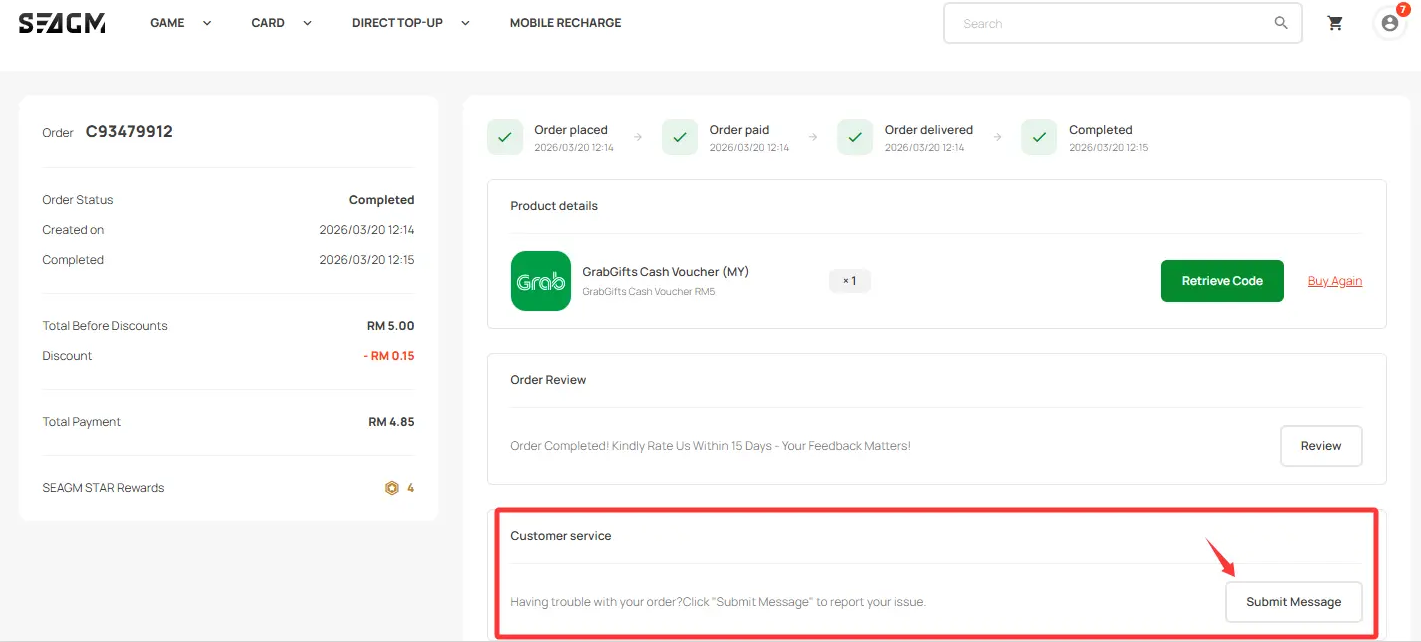
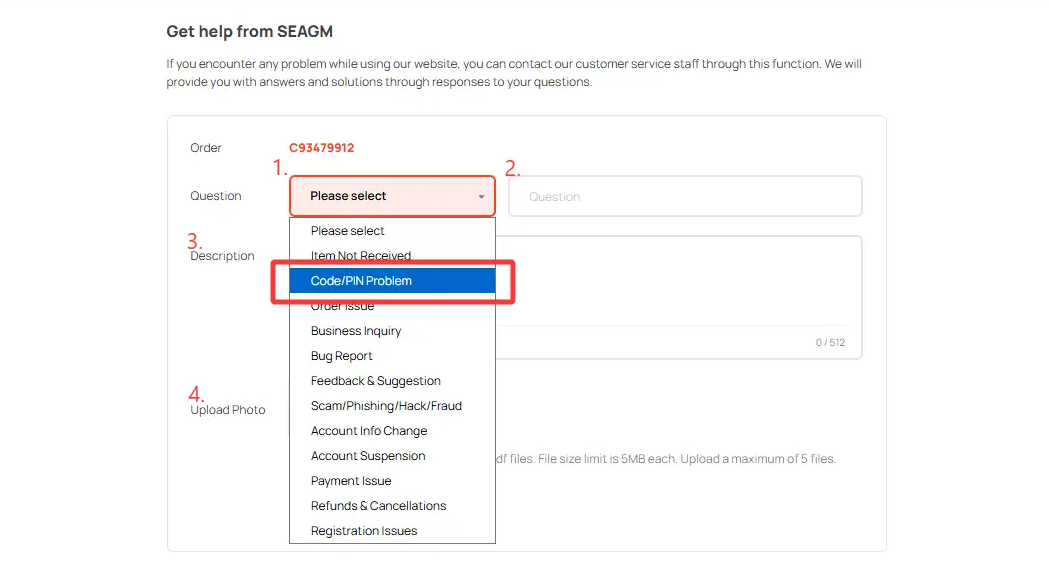
Our team will review the submitted information and conduct the necessary checks. If further verification is required, the case may be referred to the relevant supplier or publisher.
3. Why is my game or gift card code showing as invalid?
If you receive an error such as “Invalid code,” “Code is not valid,” or a similar message, please check that the code has been entered correctly and that you are using the correct redemption platform.
If the issue persists, please submit a Code/PIN Problem report with a screenshot of the error for further checking.
4. Why does my code show as already redeemed or used?
If you receive an error such as “Code has already been redeemed” or “Code has been used”, please make sure you are signed in to the correct game or service account and check whether the purchased value, balance, or item has already been credited.
If the code still cannot be redeemed, please avoid repeatedly attempting to redeem it. You may submit a Code/PIN Problem report for further checking.
5. What should I do if my code shows as expired?
If a code purchased from SEAGM shows as expired during redemption, please take a clear screenshot of the error message for further checking. You may submit a Code/PIN Problem report through your SEAGM account for further checking.
6. What should I do if I receive a “Failed to redeem” error?
Please confirm that you are using the correct redemption website or platform and that the code is being redeemed according to the product instructions. If the error continues, please take a screenshot of the error message and submit a Code/PIN Problem report for further checking.
7. What if I purchased the wrong product or region?
Please carefully check the product title, region, currency, platform, and product description before completing your purchase. Products with regional or other usage restrictions must be redeemed according to the requirements stated on the product page. A wrong purchase may not be eligible for cancellation, exchange, or refund once the product has been delivered.
For more information, please refer to SEAGM's Terms of Sale.
8. Will I receive a refund or replacement if my code is confirmed to have an issue?
If the investigation confirms that the code itself has an issue, the available resolution may include a replacement code or refund, depending on the circumstances and verification results.
The available resolution will be provided once the investigation has been completed.
9. How long does the investigation take?
Code-related investigations normally take around 1–5 working days, excluding Saturdays, Sundays, and Malaysia public holidays. The actual processing time may vary depending on the product and how long the relevant publisher, supplier, or service provider takes to complete the verification.
10. Why can't my refund or replacement be provided immediately?
Game and gift card codes are supplied to SEAGM through our authorised suppliers or publishers. When a code-related issue is reported, we may need to verify the code status and transaction details with the relevant supplier or publisher before determining the appropriate resolution.
Once the necessary verification is completed, we will provide the available next steps based on the investigation results.
11. What if my issue is not listed above?
If you encounter a game or gift card code issue that is not covered above, you can submit a Code/PIN Problem report through the affected order in your SEAGM account with your order number, error message, and screenshot where applicable.
Our team will review the available information and advise you on the appropriate next steps.
Please do not share your full game or gift card code publicly or with anyone other than SEAGM Support when submitting an issue report. Provide only the information requested by our support team for checking and verification.
ขอบคุณ
เยี่ยมชม เว็บไซต์สนับสนุน SEAGM เพื่อรับคำตอบและคำแนะนำอย่างรวดเร็ว
ต้องการความช่วยเหลือใช่ไหม? ติดต่อเรา ฝ่ายสนับสนุนลูกค้า ผ่านทาง LiveChat .