Join your friends in Moba Legends: 5v5!, the brand new 5v5 MOBA showdown, and fight against real players! Choose your favourite heroes and build the perfect team with your comrades-in-arms! 10-second matchmaking, 10-minute battles. Laning, jungling, pushing, and teamfighting, all the fun of PC MOBA and action games in the palm of your hand! Feed your eSports spirit! Moba Legends: 5v5!, the fascinating MOBA game on mobile. Smash and outplay your enemies and achieve the final victory with your teammates!
Important Note:
- All purchases made on SEAGM are final. Once an order has been successfully delivered, it is strictly non-returnable, non-exchangeable, and non-refundable.
- Moba Legends: 5v5 sold on SEAGM is region-locked and is only compatible with the Indian version. Kindly ensure your account region is correct before placing an order.
Step 1: Once the purchase from SEAGM is completed, kindly retrieve your game card code in "My Cards".
Step 2: Launch Moba Legends: 5v5 on your device. If you haven’t installed it yet, please download the game and complete the registration process.
Step 3: Tap your avatar icon in the top-left corner of the main screen to open your profile.
Step 4: Go to the Settings tab and select Redemption Code.
Step 5: Enter your game card code exactly as it appears in the SEAGM My Cards section, including uppercase letters and dashes if any.
Step 6: Tap Okay to submit the code.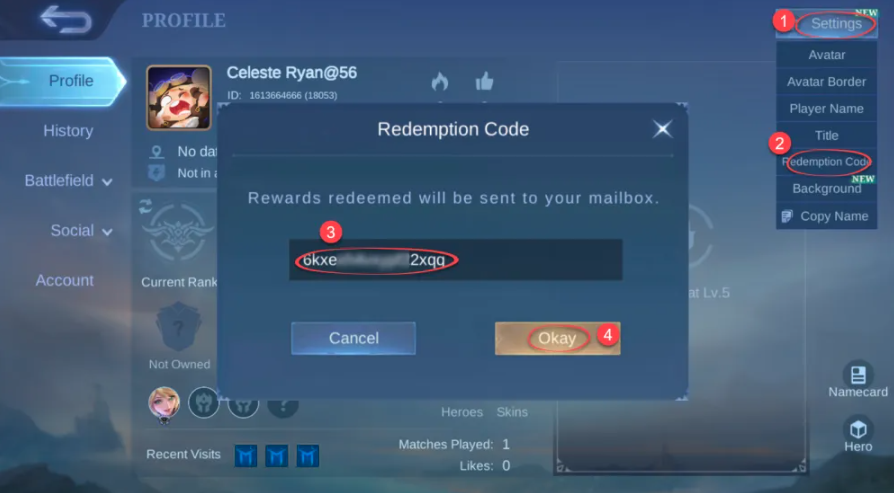
Step 7: Check your in-game mailbox for the diamonds or rewards. If they don’t appear immediately, wait a few minutes and check again.
ขอบคุณ
เยี่ยมชม เว็บไซต์สนับสนุน SEAGM เพื่อรับคำตอบและคำแนะนำอย่างรวดเร็ว
ต้องการความช่วยเหลือใช่ไหม? ติดต่อเรา ฝ่ายสนับสนุนลูกค้า ผ่านทาง LiveChat .