Step 1: Once logged in to your SEAGM account, click "Top Up" at the top right corner.

Step 2: At the user credit balance topup, key in the top-up amount needed. Next, click 'Top up' to proceed.

Step 3: At the SEAGM Pay page, choose online banking and select the desired bank/payment channel, then click "Pay Now."
Note: You may be asked to allow pop-ups and redirect windows from the payment gateway. To enable the pop-ups, kindly refer to the Google support page. 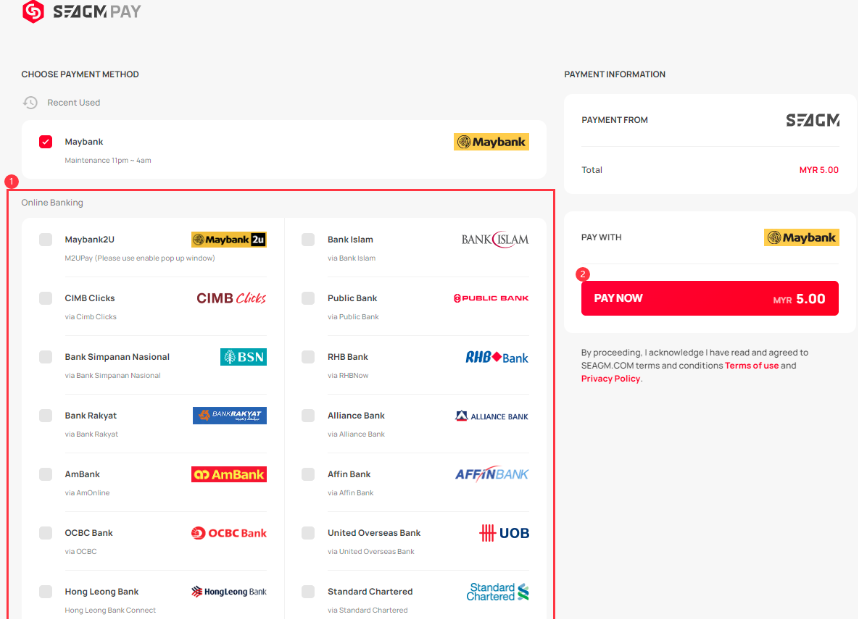
Step 4: At the Online Banking page that you've chosen, log in to your online banking account to continue. Kindly follow the on-screen instructions to make the payment and allow the payment gateway to redirect you back to our website to complete the transaction.
Step 5: Once you have successfully topped up your SEAGM account credits balance, you may check the balance in "Transaction History". 
ขอบคุณ
เยี่ยมชม เว็บไซต์สนับสนุน SEAGM เพื่อรับคำตอบและคำแนะนำอย่างรวดเร็ว
ต้องการความช่วยเหลือใช่ไหม? ติดต่อเรา ฝ่ายสนับสนุนลูกค้า ผ่านทาง LiveChat .