Kao The Kangaroo is a 3D platformer from veterans of the genre Tate Multimedia, featuring a plucky, cheeky, but cutie Kao The Kangaroo (Hey, just like in the title!) on a quest to uncover the truth around the disappearance of his father.
Note:
- The Steam Wallet Code sold in SEAGM was a region-currency-locked card. Steam users can only redeem the Steam Wallet Code according to their original currency settings.
- All purchases made in SEAGM, once they're delivered, are non-returnable, non-exchangeable, and non-refundable.
Step 1: Once the purchase from SEAGM is complete, kindly retrieve your game card code in "My Cards".
Step 2: Visit the Steam Official Site and proceed with account login.

Step 3: Under the account name, on the dropdown section, select [view my wallet].
Step 4: Select [Redeem a Steam Gift Card or Wallet Code].
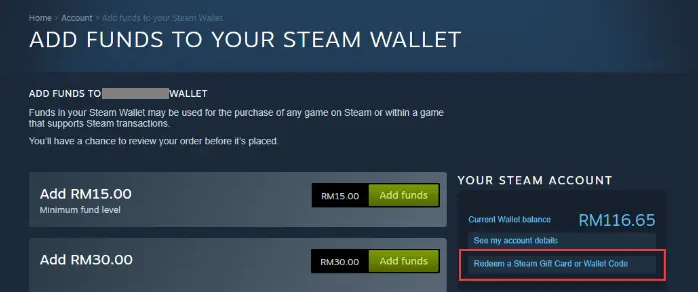
Step 5: Enter the code purchased from SEAGM and click [Continue].
Step 6: Return to the main page, search [Kao the Kangaroo], and select the game once reloaded to your account balance.
Step 7: Select the one you need and click [Add to Cart].
Step 8: Click [View my Cart].
Step 9: Choose whether for yourself or your friends. Then, click on [Continue to Payment].
Step 10: Confirm payment method as wallet, tick the agreement box and click [purchase].
Step 11: Once done, your game will be automatically installed and ready to play.
Enjoy your game!
ขอบคุณ
เยี่ยมชม เว็บไซต์สนับสนุน SEAGM เพื่อรับคำตอบและคำแนะนำอย่างรวดเร็ว
ต้องการความช่วยเหลือใช่ไหม? ติดต่อเรา ฝ่ายสนับสนุนลูกค้า ผ่านทาง LiveChat .