DuitNow is a convenient way to send and receive money instantly at your Online Banking or eWallet. Transfer funds to any DuitNow ID including Mobile number, MYKad/Passport number, Army/Police number as well as Business Registration number.
Step 1: Choose your products in SEAGM and click "PayNow" to be directed to the checkout page. 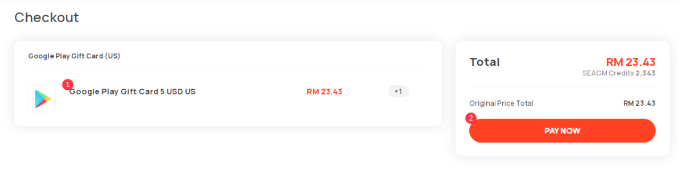
Step 2: Select the preferred bank under the offline payment section and click on "Create Payment" to proceed.
Step 3: Only clicked, details of the SEAGM bank account will be displayed. Kindly transfer the amount to the bank details as shown.
Step 4: Kindly login to your preferred Mobile Banking site/app. Then, select the "transfer" or "DuitNow transfer" option and fill in the details.
Note: The example used below will be for Public Bank mobile apps. For more information, kindly directly check on DuitNow Official Site.
Step 5: Kindly fill in the details as referred to the SEAGM checkout page to proceed.
Step 6: A confirmation page will be displayed. Kindly confirm the details with the amount and complete the transaction.
Step 7: Once the transaction is completed, kindly contact our customer support team via LiveChat for manual payment checking.
ขอบคุณ
เยี่ยมชม เว็บไซต์สนับสนุน SEAGM เพื่อรับคำตอบและคำแนะนำอย่างรวดเร็ว
ต้องการความช่วยเหลือใช่ไหม? ติดต่อเรา ฝ่ายสนับสนุนลูกค้า ผ่านทาง LiveChat .