Przelewy24 is the largest online payment operator in Poland, offering innovative solutions for the e-commerce market. Using the services of Przelewy24 allows you to carry out transactions on all devices and use many payment methods - fast transfers, BLIK, payment cards, mobile payments (Apple Pay, Google Pay), electronic wallets or instalments.
Note:
1. Przelewy24 payment method is ONLY available for Poland users under Polish złoty [PLN] in SEAGM.
2. Kindly make sure that NO virtual private network (VPN) has been enabled during checkout.
Step 1: Choose your products in SEAGM, then click "PayNow" to be directed to the checkout page.
Step 2: On the payment page, select Przelewy24 under Online Banking. Then click on 'Pay Now".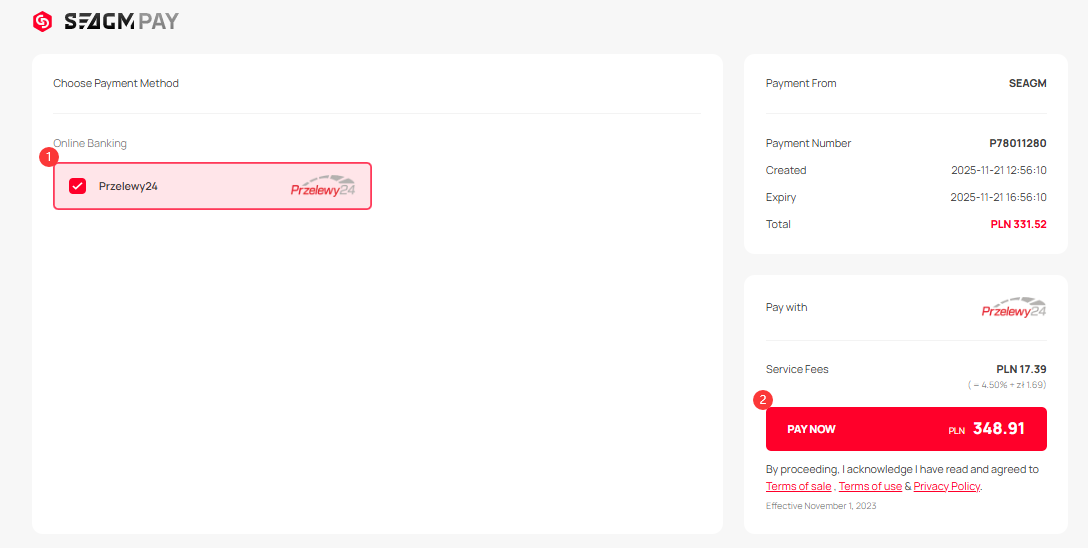
Step 3: Once clicked, you will be directed to the Smart2Pay Przelewy24 payment page. Kindly select your preferred method and click on it.
Step 4: Once selected, you will be directed to the relevant bank payment page to complete the transaction.
Example: Pocztowy24
Example: Ing
Example: Santander
Step 4: Kindly follow the on-screen instructions to make the payment. Once the transaction is complete, please allow the payment gateway to redirect you back to our website to finalise the transaction.
Note: Please allow our website to fully load once your transaction is completed to prevent floating orders.
Step 5: You may check your order status under "My Orders" in your SEAGM profile.
ขอบคุณ
เยี่ยมชม เว็บไซต์สนับสนุน SEAGM เพื่อรับคำตอบและคำแนะนำอย่างรวดเร็ว
ต้องการความช่วยเหลือใช่ไหม? ติดต่อเรา ฝ่ายสนับสนุนลูกค้า ผ่านทาง LiveChat .