Return to the Valley of the Mines in this faithful remake of the genre-defining open world RPG. Explore a hand-crafted, organic open world that reacts dynamically to your actions. Whether you're a seasoned Gothic veteran or this is your first time being thrown into the colony, you're in for a true RPG experience with unrestricted exploration like no other.
Note: All purchases made in SEAGM, once they're delivered, are non-returnable, non-exchangeable, and non-refundable.
Step 1: Once the purchase from SEAGM is completed, kindly retrieve your game card code in "My Cards".
Step 2: Kindly launch the Steam client and log in to your Steam account.
Step 3: Once logged in, kindly click on the "Games Menu" option at the top of the Steam client page. 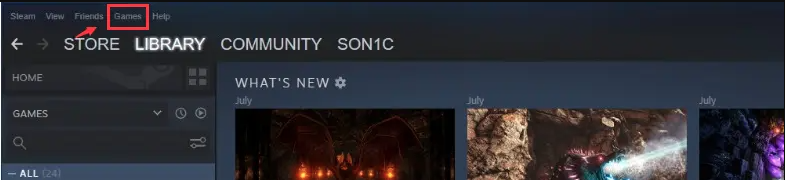
Step 4: Then, select "Activate a Product on Steam".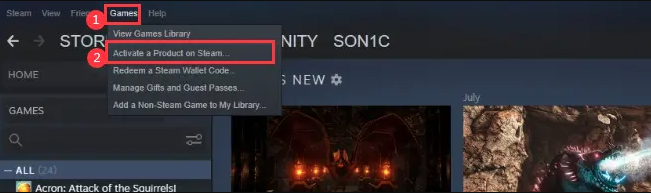
Step 5: Once clicked, you will be redirected to another page to redeem the code. Kindly click on "next", then "I Agree". 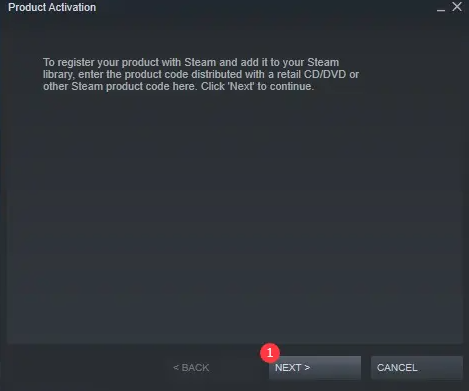
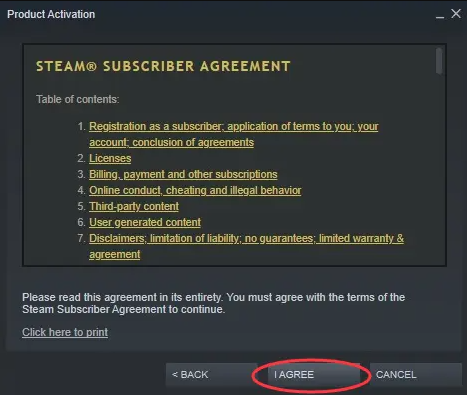
Step 6: Kindly enter the Gothic 1 Remake pin purchased from SEAGM, and click "Next".
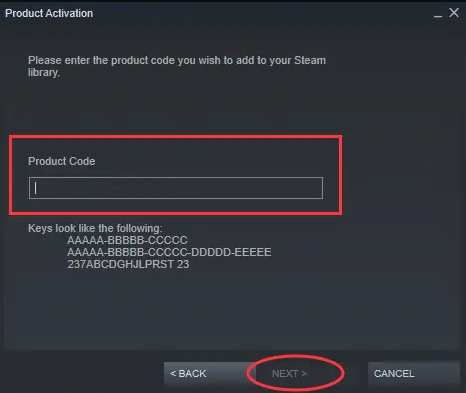
Step 7: Once done, you may install the CD key and enjoy the game!
Thank you.
Visit the SEAGM Support site for quick answers and guides.
Need support? Contact our Customer Support via LiveChat .