iTunes Gift Card code is redeemable for apps, games, music, movies, TV shows, and more on the iTunes Store, App Store, iBooks Store, and the Mac App Store. Recipients can access their content on an iPhone, iPad, or iPod, and watch or listen on a computer – Mac or PC.
Note: Apple iTunes Gift Card sold by SEAGM is region-locked. Kindly purchase according to your iTunes account registered region.
To redeem iTunes Gift Card on your iPhone, iPad, or iPod touch:
Step 1: Once you have completed the purchase from SEAGM, kindly retrieve your game card code in "My Cards".
Step 2: On your device, open the iTunes Store App.
Step 3: Click your avatar, scroll to the bottom of the Featured section, and tap "Redeem code". 

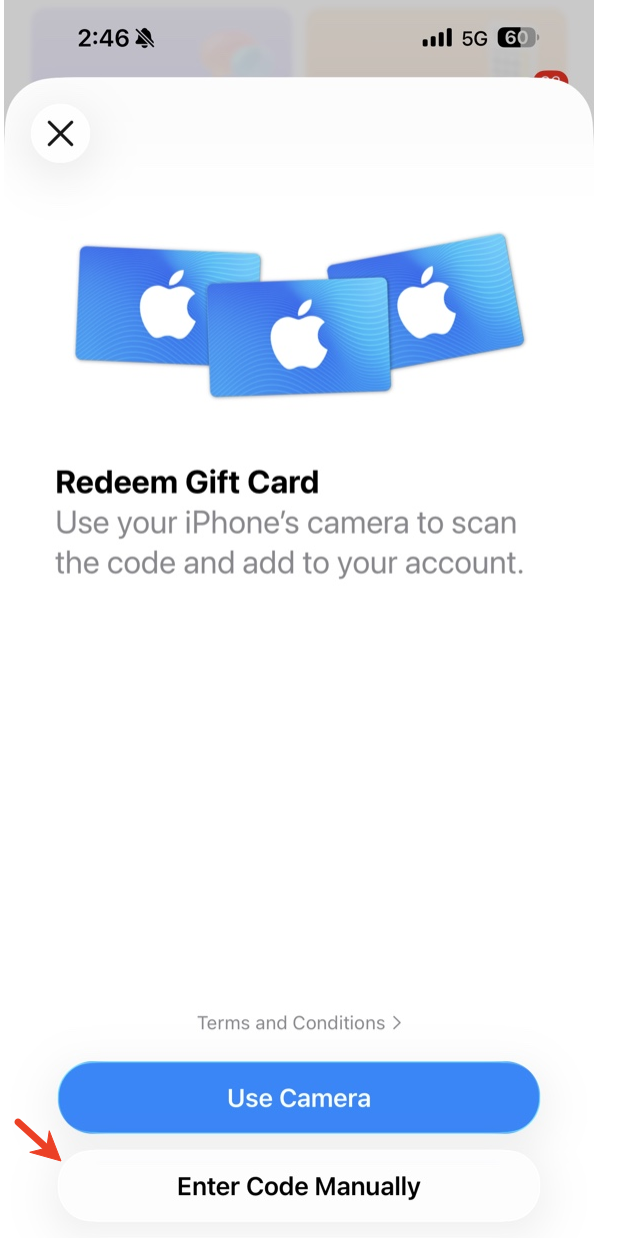
Step 4: Tap "Enter code manually" and enter the 16-digit code retrievable from the My Game Card Page, then tap "Redeem".
Step 5: After the redemption is successful, your iTunes account balance automatically updates.
To redeem an iTunes Gift Card on your Mac:
Step 1: Log in to your SEAGM account. Go to the My Cards page and enter your SEAGM login password, then click 'Submit'.
Step 2: On your Mac, click Sign In, then enter your Apple ID and password.
Step 3: Click your name. Choose Redeem from the top right or bottom of the page based on your current macOS version, then enter your password again.
(i) Top:
(ii) Bottom:
Step 4: Enter the 16-digit code, which starts with X, retrievable from My Game Card Page.
Step 5: Click Redeem. After redemption is successful, your iTunes account balance automatically updates.
Thank you.
Visit the SEAGM Support site for quick answers and guides.
Need support? Contact our Customer Support via LiveChat .