Important Note:
- Starbucks Gift Cards sold by SEAGM are region-restricted. Please confirm your region before purchase.
- All purchases made in SEAGM, once they're delivered, are non-returnable, non-exchangeable, and non-refundable.
- Please ensure your Starbucks App is updated to the latest version for a smooth login experience.
Step 1: Once the purchase from SEAGM is completed, kindly retrieve your game card code in "My Cards".
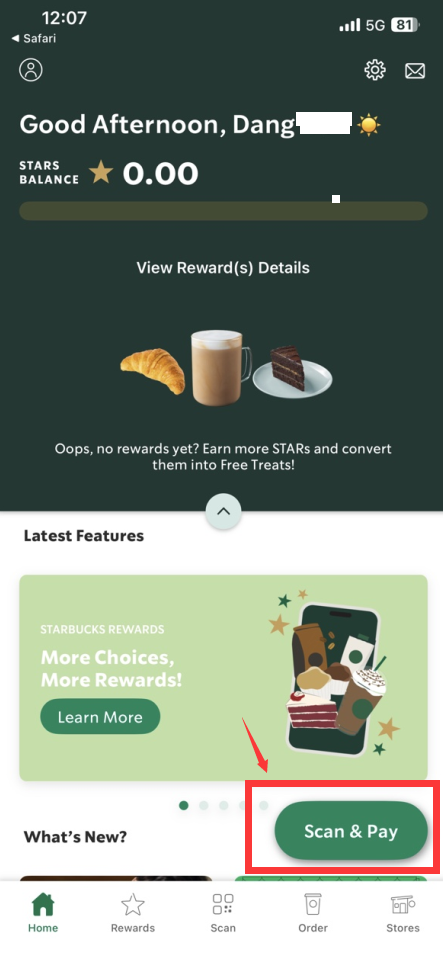
Step 2: Sign in to your Starbucks account from Apps.
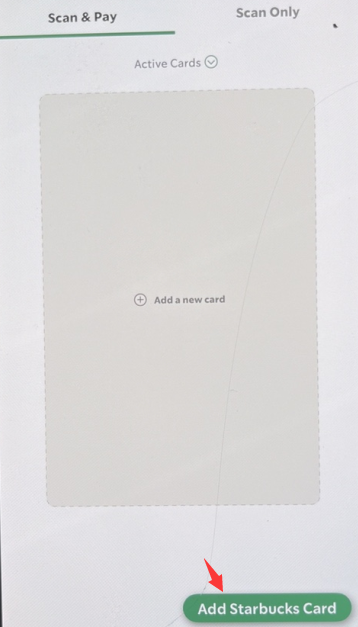
Step 3: Navigate to [PAY]. Then, click on [ADD CARD]. Enter the Card Number (Code from your voucher link) and Security Code (Activation PIN from your voucher link).
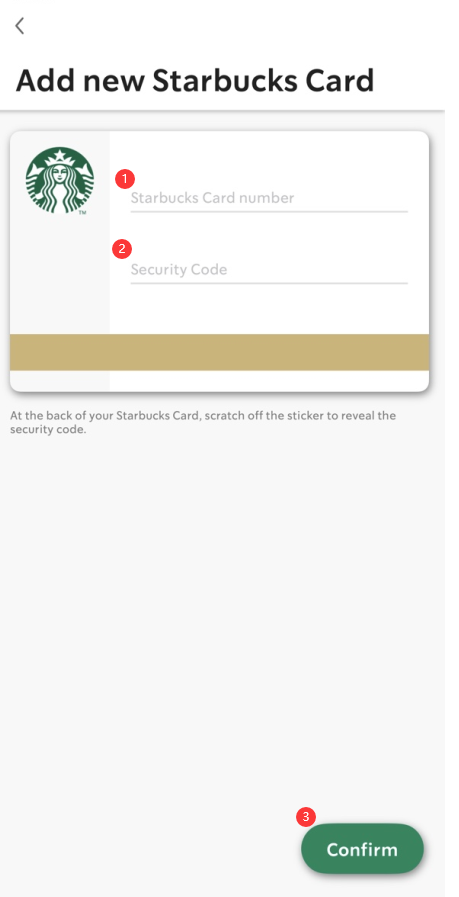
Step 4: Click on confirm to complete the process. You will be able to check in Apps anytime on the card details.
ขอบคุณ
เยี่ยมชม เว็บไซต์สนับสนุน SEAGM เพื่อรับคำตอบและคำแนะนำอย่างรวดเร็ว
ต้องการความช่วยเหลือใช่ไหม? ติดต่อเรา ฝ่ายสนับสนุนลูกค้า ผ่านทาง LiveChat .