Note: All purchases made in SEAGM are non-returnable, non-exchangeable, and non-refundable once they are delivered.
Step 1: Once the purchase from SEAGM is completed, kindly retrieve your game card code in "My Cards".
Step 2: Kindly launch the Steam client software and log in to your Steam account.
Step 3: Once logged in, kindly click on the "Games Menu" option at the top of the Steam client page.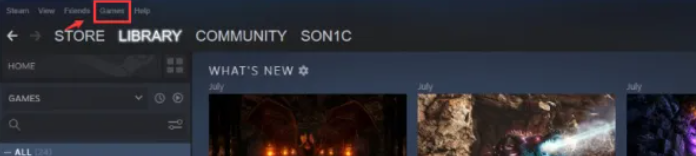
Step 4: Then, select "Activate a Product on Steam".
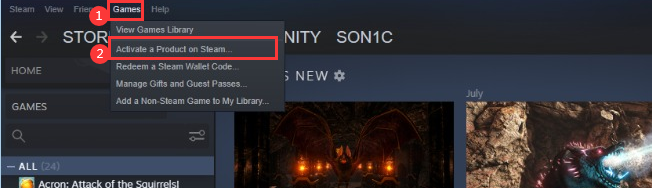
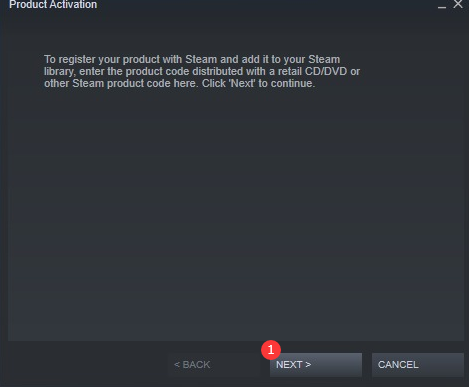
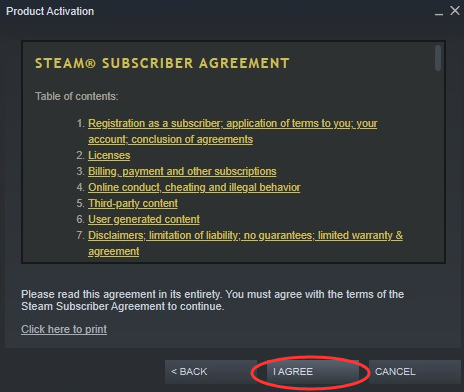
Step 5: Once clicked, you will be directed to another page for code redemption. Kindly click on "next", then "I Agree".
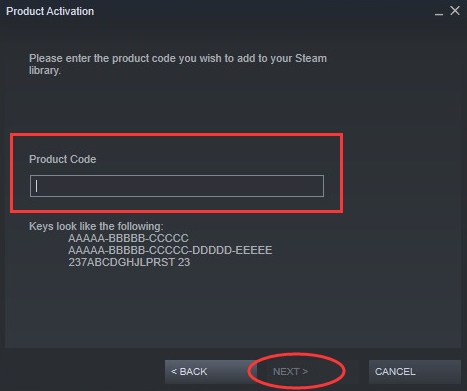
Step 6: Kindly enter the Dying Light: The Beast PIN purchased from SEAGM, and click "Next".
Step 7: Once done, you may install the CD key and enjoy the game!
ขอบคุณ
เยี่ยมชม เว็บไซต์สนับสนุน SEAGM เพื่อรับคำตอบและคำแนะนำอย่างรวดเร็ว
ต้องการความช่วยเหลือใช่ไหม? ติดต่อเรา ฝ่ายสนับสนุนลูกค้า ผ่านทาง LiveChat .