Borderlands 4 brings intense action, badass Vault Hunters, and billions of wild and deadly weapons to an all-new planet ruled by a ruthless tyrant.
Note:
- All purchases made in SEAGM, once they're delivered, are non-returnable, non-exchangeable, and non-refundable.
- This gift card is only available for the Steam EU version.
Step 1: Log in/register an account in SEAGM. On the top menu, enter the keywords "Borderlands" and search. Select "Borderlands 4 (Steam EU)".

Step 2: Select the type of card, enter the quantity and click "buy now" to proceed.
Step 3: Please confirm the type of card and quantity, then click "Pay Now" once confirmed.
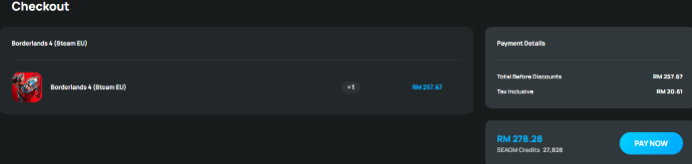
Step 4: Select your preferred payment method and click "Pay Now" to finalise your payment.
Step 5: Once payment is completed, you may retrieve your code under your User profile in My Cards. For pre-ordered products, it might take a few working days for the card to be delivered.
ขอบคุณ
เยี่ยมชม เว็บไซต์สนับสนุน SEAGM เพื่อรับคำตอบและคำแนะนำอย่างรวดเร็ว
ต้องการความช่วยเหลือใช่ไหม? ติดต่อเรา ฝ่ายสนับสนุนลูกค้า ผ่านทาง LiveChat .