Step 1: Visit the WTFast Official Website and log in to your WTFast account. Select "Account", then click "Enter Key".
Step 2: Enter the WTFast key code purchased from SEAGM, then click "Activate".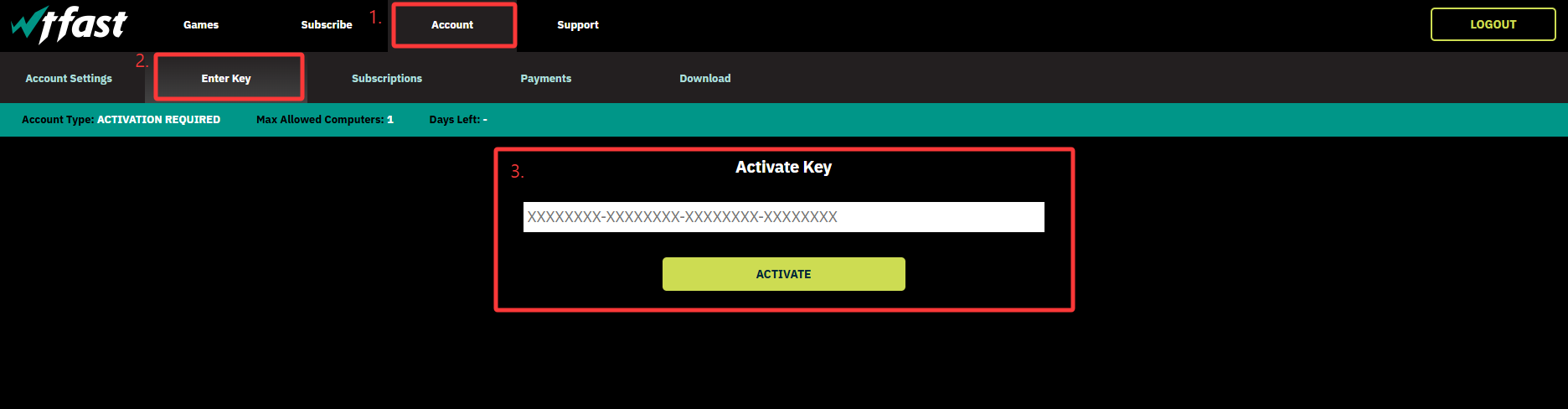
Step 3: Once the activation is completed, your subscription will be automatically updated in your WTFast account.
ขอบคุณ
เยี่ยมชม เว็บไซต์สนับสนุน SEAGM เพื่อรับคำตอบและคำแนะนำอย่างรวดเร็ว
ต้องการความช่วยเหลือใช่ไหม? ติดต่อเรา ฝ่ายสนับสนุนลูกค้า ผ่านทาง LiveChat .