Step 1: Log in to your PUBG Mobile game account.
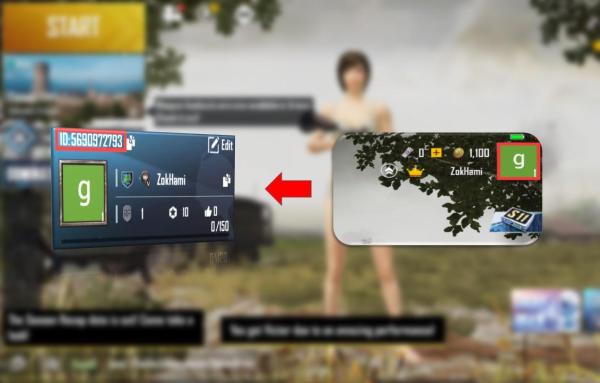
Step 2: Click your avatar on the top-right corner.
Step 3: Your PUBG Mobile Player ID will be displayed as shown below:
Thank you.
Visit the SEAGM Support site for quick answers and guides.
Related articles:
How to buy PUBG Mobile UC
How to use Direct Top-Up (MY / TW / Global)?
ขอบคุณ
เยี่ยมชม เว็บไซต์สนับสนุน SEAGM เพื่อรับคำตอบและคำแนะนำอย่างรวดเร็ว
ต้องการความช่วยเหลือใช่ไหม? ติดต่อเรา ฝ่ายสนับสนุนลูกค้า ผ่านทาง LiveChat .