Maybank QRPay now adopts the DuitNow QR code standard. All QRPayBiz merchants can now accept payments from the Maybank2u MY app, the all-new app – MAE by Maybank2u, and mobile apps from participating banks and e-wallets using a single, unified Maybank QR code.
Important note: Maybank QRPay is ONLY supported under Malaysian Currency [MYR] for the majority of products in SEAGM.
Step 1: Choose your products in SEAGM and select a voucher if available, then click "Buy Now". Next, kindly click on "PayNow" to be directed to the checkout page.
Step 2: Select MaybankQRPay under the Online Payment via E-wallets section and click on "Pay Now" to proceed.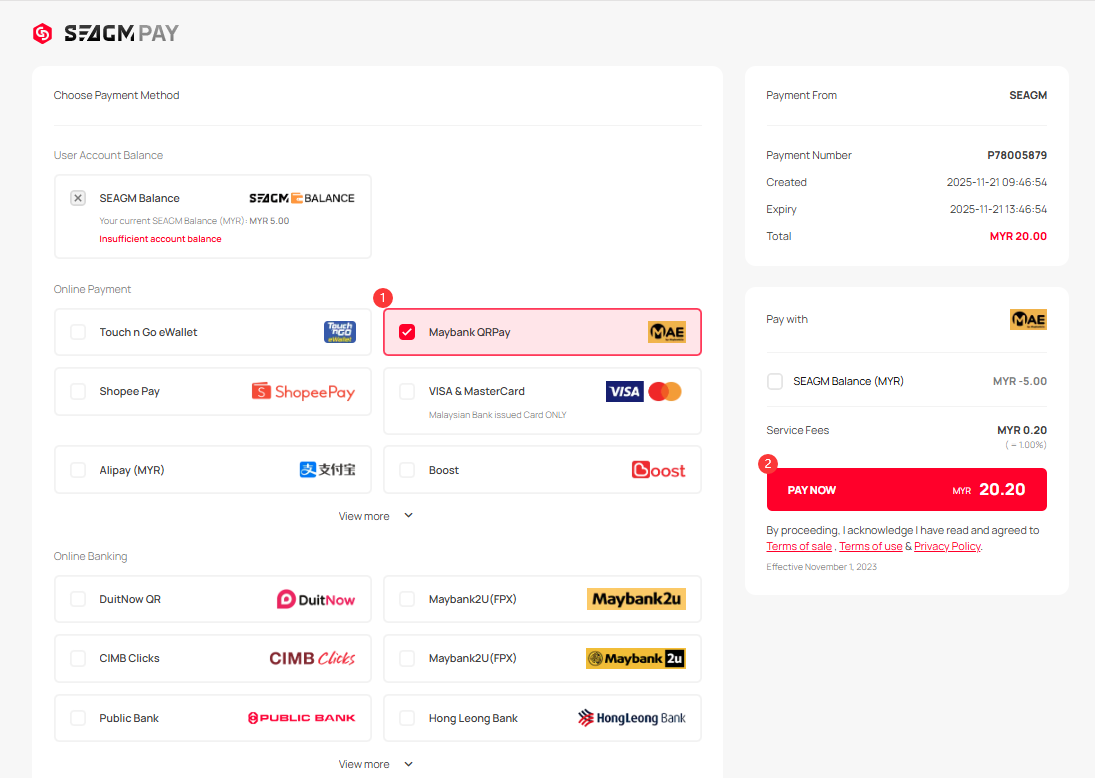
Step 3: Once clicked, a Maybank QRPay Code will be displayed. 
Step 4: Kindly log in to your Maybank app from your mobile phone. Then, select the QRPay payment option and scan the QR code displayed at checkout.
Step 5: After you have scanned the QR code, a confirmation page will be displayed. Kindly confirm the details and click "Pay" to complete the transaction.
*The displayed image is for illustration only.
Step 6: Once the transaction is completed, you may view your order status under "My Orders" in your SEAGM profile.
ขอบคุณ
เยี่ยมชม เว็บไซต์สนับสนุน SEAGM เพื่อรับคำตอบและคำแนะนำอย่างรวดเร็ว
ต้องการความช่วยเหลือใช่ไหม? ติดต่อเรา ฝ่ายสนับสนุนลูกค้า ผ่านทาง LiveChat .